
iOS (AVPlayer)
Example of video playback on iOS using AVPlayer
import SwiftUIimport AVKit
struct MyView: View {    // Change the url to the Cloudflare Stream HLS manifest URL    private let player = AVPlayer(url: URL(string: "https://customer-9cbb9x7nxdw5hb57.cloudflarestream.com/8f92fe7d2c1c0983767649e065e691fc/manifest/video.m3u8")!)
    var body: some View {        VideoPlayer(player: player)            .onAppear() {                player.play()            }    }}
struct MyView_Previews: PreviewProvider { static var previews: some View { MyView() }}- Download this example app ↗ from Apple’s developer docs
- Open and run the app using Xcode ↗.
- Search in Xcode for
m3u8, and open theStreamsfile - Replace the value of
playlist_urlwith the HLS manifest URL for your video.
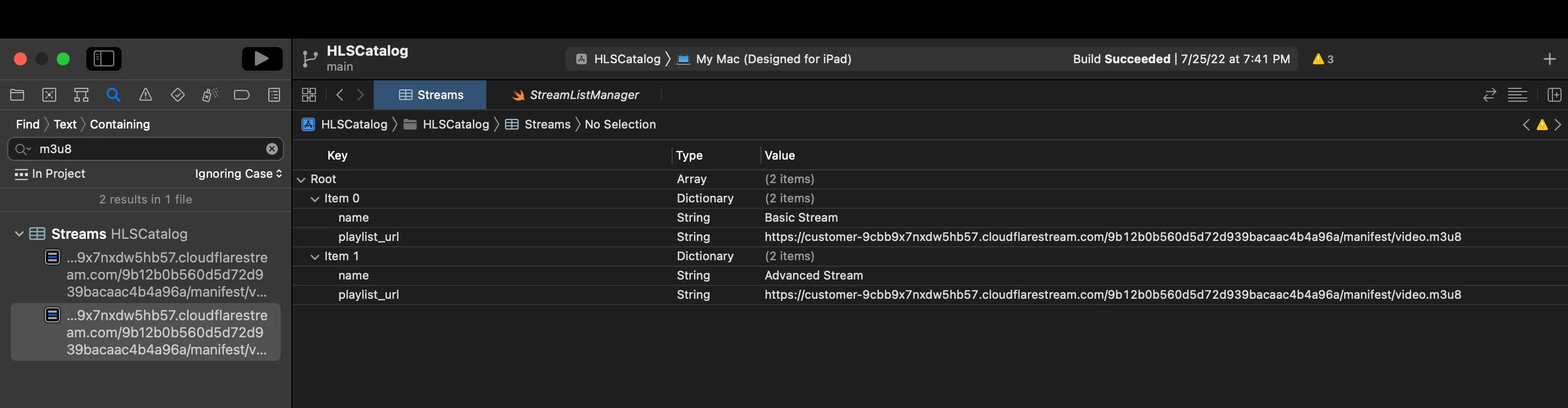
- Click the Play button in Xcode to run the app, and play your video.
For more, see read the docs.